Frequently Asked Questions
Where can I download older versions?
Visit this page.
Does it work on all macOS versions since 11.0?
Yes it does!
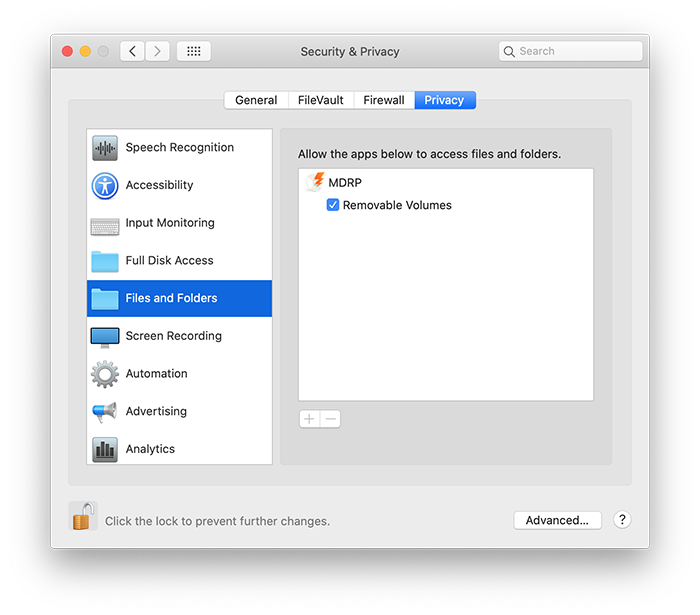
MDRP works fine provided you give the app the permissions it needs.
If you refuse the app access to your volumes, the app will not function properly. Go to the System Prefences to enable that permission.
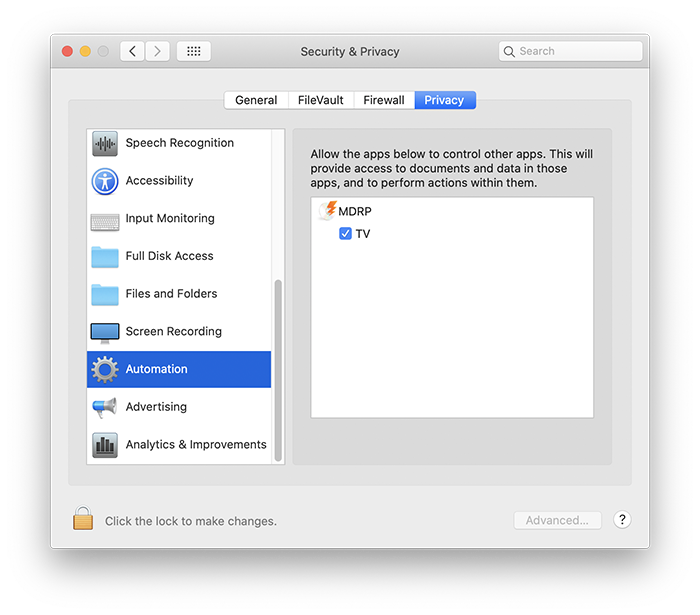
If you want the auto-import to work, you also have to allow MDRP to use automation.
Where can I recover my serial number?
Simply use our recover form.
Do I need to pay for MDRP v13?
If you bought MDRP after April 28th, 2024, your serial is already valid for version 10.
How do I use upscaling?
Simply check the 'To HD' checkbox of the 'Rip and Convert' ripping action. If you enable the 'Convert to HD' checkbox in the Preferences, the 'Rip and Convert' ripping action will convert to HD by default. There are 3 modes for upscaling, which you can select in the Preferences. The normal upscaling, which uses traditional algorithms to upscale (like changing image size in Photoshop). The super resolution mode uses a neural network to augment the details of the images. The blended mode mixes both in the result, which I personally prefer as it's a bit more smooth, but others might prefer the non-blended result.
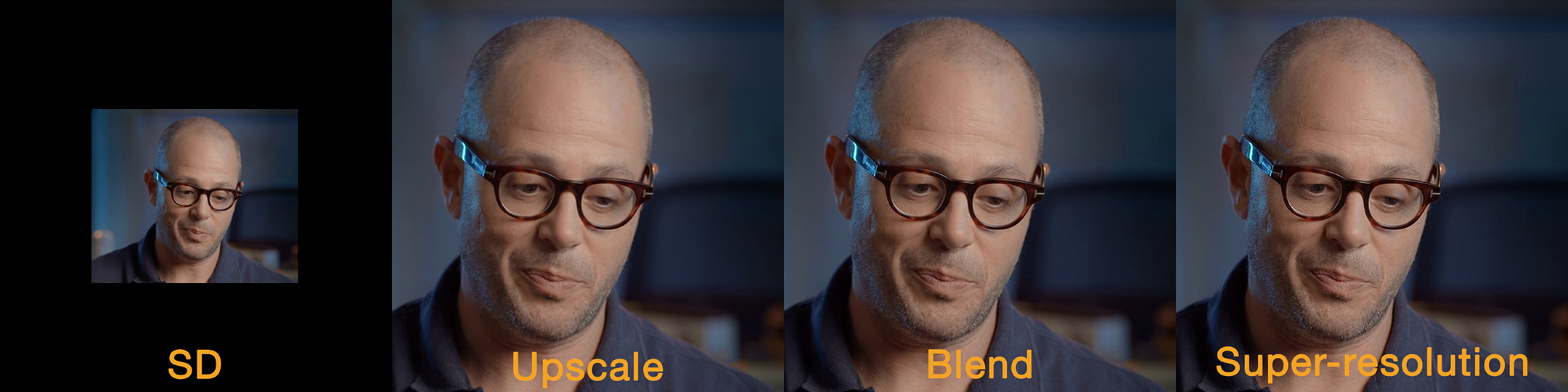
(Scroll right to see the 4 versions)
I own an older version MDRP, what is the upgrade price for v13.x ?
It's $24.95. If you already have v12.x registered, v13.x will redirect you to the proper upgrade page when it will detect your v12.x serial.
You can also use our online upgrade page. If nothing works, contact us with your previous order info.
My serial doesn't work, what to do?
You're probably trying to enter a v13.x serial in an older version.
Download the last version by clicking the 'Try it' button on the main page.
All our serials begin by the letters "MDRP". If your serial starts with "BD", you got confused and bought another product with an extra X in its name.
How do I rip to ISO?
Select 'Full disc image' next to the ripping action number.
How do I burn a backup?
Use the 'Full disc image and burn a copy' ripping mode and insert a double-layer blank DVD when asked. Use the slowest burn speed, since most media will not burn properly at the advertised speed.
I used 'Rip and Convert' and subtitles for foreign parts of the movie were not there, why?
Forced subtitles are typically for foreign language parts of a movie, although some DVDs use a dedicated track. The best is to use 'Select With Player', which will automatically select the correct one..
Burning fails yet my burner is fine, why?
The blank DVD disc you are using might be too small for the data you want to burn. Also, make sure to update to latest version of Mac DVDRipper Pro.
How can I watch a DVD with Front Row?
While the dvdmedia extension is recognized by DVD Player, it is not by Front Row. Rename the file to remove the extension (use Get Info -> Name & Extension). You can also disable the use of the extension in the Preferences.
How can I watch a disc image in Front Row or DVD Player?
Double-click the ISO file to mount it and point the application to the VIDEO_TS folder inside the newly displayed volume.
The video I ripped does not play correctly on my Apple TV 1st generation?
Enable the 'Support old iPods' checkbox in the Preferences and re-rip.
The update mechanism failed, why?
You probably renamed the application. You can simply download the latest version from the website.
Can I get a refund?
You can try Mac DVDRipper Pro for free before purchasing it. Make sure to use the free trial.
Can I extract just the main feature?
This is possible since version 2.x.
Does MDRP support region code mismatch?
The DVD disc region must match the DVD drive region to be supported. Ripping might still work, but it is not supported. We suggest buying a cheap external dvd usb drive and set its region to the other region to handle this case.
Can I remove region coding?
That is currently impossible and for some DVDs it would require modifying the DVD structure, so it is unlikely to be added.
Does Mac DVDRipper Pro handle Bluray discs?
No only DVDs.
Can I use Mac DVDRIpper Pro with a remote DVD (using DVD sharing)?
No, this is not supported.
A given DVD does not rip correctly. What happened?
If you canceled the rip, then you cannot know for sure. Some DVDs can take a few hours to rip and Mac DVDRipper Pro may seem to hang. Make sure you let it finish. Also, use the disc image mode, as it is more likely to be successful.
How can I downgrade to an older version ?
Use the 'Download old versions...' menu item from the 'Help' menu., or simply visit this page.
I'd like the Technical Window back...
To activate, run this in the Terminal:defaults write com.mdrp.MDRP mKeepTechnicalWindow -bool YES
To revert to default:defaults delete com.mdrp.MDRP mKeepTechnicalWindow
More Questions
Be sure to also read the tutorials.
If you have further questions or need any assistance, you may contact us.